

Deployment Overview
The following are recommended deployment approaches depending on the use case.
| Use case | Comments | Infrastructure size | Recommended deployment approach |
|---|---|---|---|
| Small Full Stack deployment deployment | Server, Switch, Stoarge, VM management, Cluster management | less than 300 nodes | Appliance-based deployment |
| Large Full Stack deployment deployment | Server, Switch, Stoarge, VM management, Cluster management | more than 300 nodes | Kubernetes-based deployment |
| Fabric Manager deployment | Switch management | less than 100 switches | Appliance-based deployment |
| Bare Metal as a Service deployment | Server & Storage management, offered as a service | any | Kubernetes-based deployment |
| GPU as a Service deployment | Similar to full stack, offered as a service | any | Kubernetes-based deployment |
| Small VM as a Service deployment | Either just VM management or together with Full Stack | less than 300 nodes | Appliance-based deployment |
| Large VM as a Service deployment | Either just VM management or together with Full Stack | more than 300 nodes | Kubernetes-based deployment |
To Deploy the MetalSoft solution, we suggest you follow this guide to get an overall understanding of the required information and steps.
Example configuration
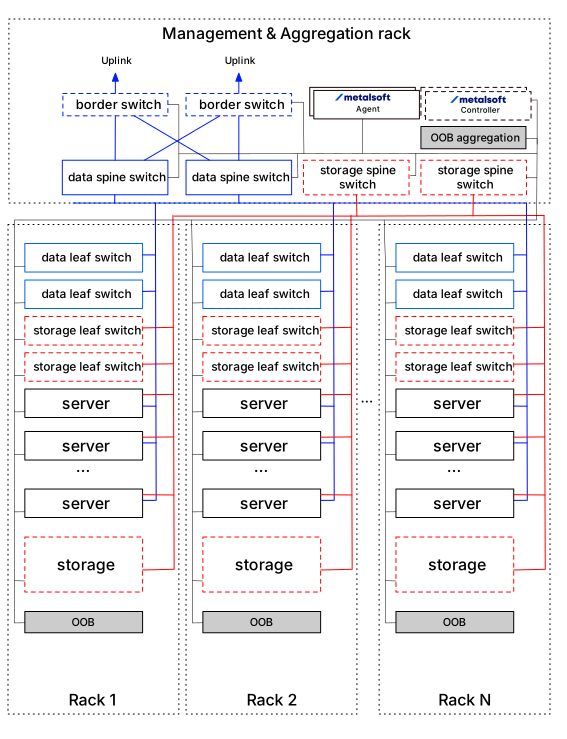
Section titled “Example configuration”The following is a reference setup of a site that also has the management domain represented. Note that this is just a demonstration and most of the time this is customized for the respective customer.
Kubernetes-based deployment
Section titled “Kubernetes-based deployment”This setup requires a client-provided kubernetes cluster and at least one VM for the Site Controller in each site. In addition to this, firewall configuration needs to be set up between the Global Controller/Site Controller, the end user and the Internet (or towards an Artifactory repository).
For more information, please visit:
Appliance (OVA-based) deployment
Section titled “Appliance (OVA-based) deployment”This setup is typically used for smaller deployments when there are fewer devices under management. In this setup only two VMs are typically deployed, often on the same hypervisor.
For more information, please visit:
Create Users/Accounts
Section titled “Create Users/Accounts”Once the Global Controller and Site Controllers are connected, you can log into the Admin UI of the Global Controller and click on Users & Permissions on the left, then click on Users and Add User. Default roles of “root”, for admin users and “user” for users who can only log into the User UI are pre-defined along with a few others, but you can set up new custom roles.
When you have set up the users, you can then set up Accounts by clicking on Accounts → Add account and then add users to the account.
For more information, please visit:
Users and Permissions
Additional integrations
Section titled “Additional integrations”Your installation is now complete. You can either proceed to registering the hardware, or, if you need to integrate MetalSoft with other external tools, visit the following resources first:
- Integrating with Active Directory
- Integrating with a SAML provider (OKTA)
- Integrating with an external DNS provider
Registering the hardware and additional configurations:
Section titled “Registering the hardware and additional configurations:”You should now proceed to register your initial hardware: