

App extensions
Available since 6.4, current schema since 7.4
Application (“app”) extensions add a custom deployable product to MetalSoft: a button in the Infrastructure Designer that renders a form, provisions infrastructure (servers, networks, IPs, DNS records, shared drives), and runs your Ansible playbooks to install and manage the product on top — for example an OpenShift or VMware Cloud Foundation cluster.
This page describes the lifecycle. For the full definition schema see the extension definition reference, and for the Ansible side (inventory, variables, scaling) see Structuring Ansible bundles.
Create lifecycle
Section titled “Create lifecycle”- The user clicks the extension’s button in the Infrastructure Designer, and MetalSoft shows a form with the fields defined in the
inputssection:
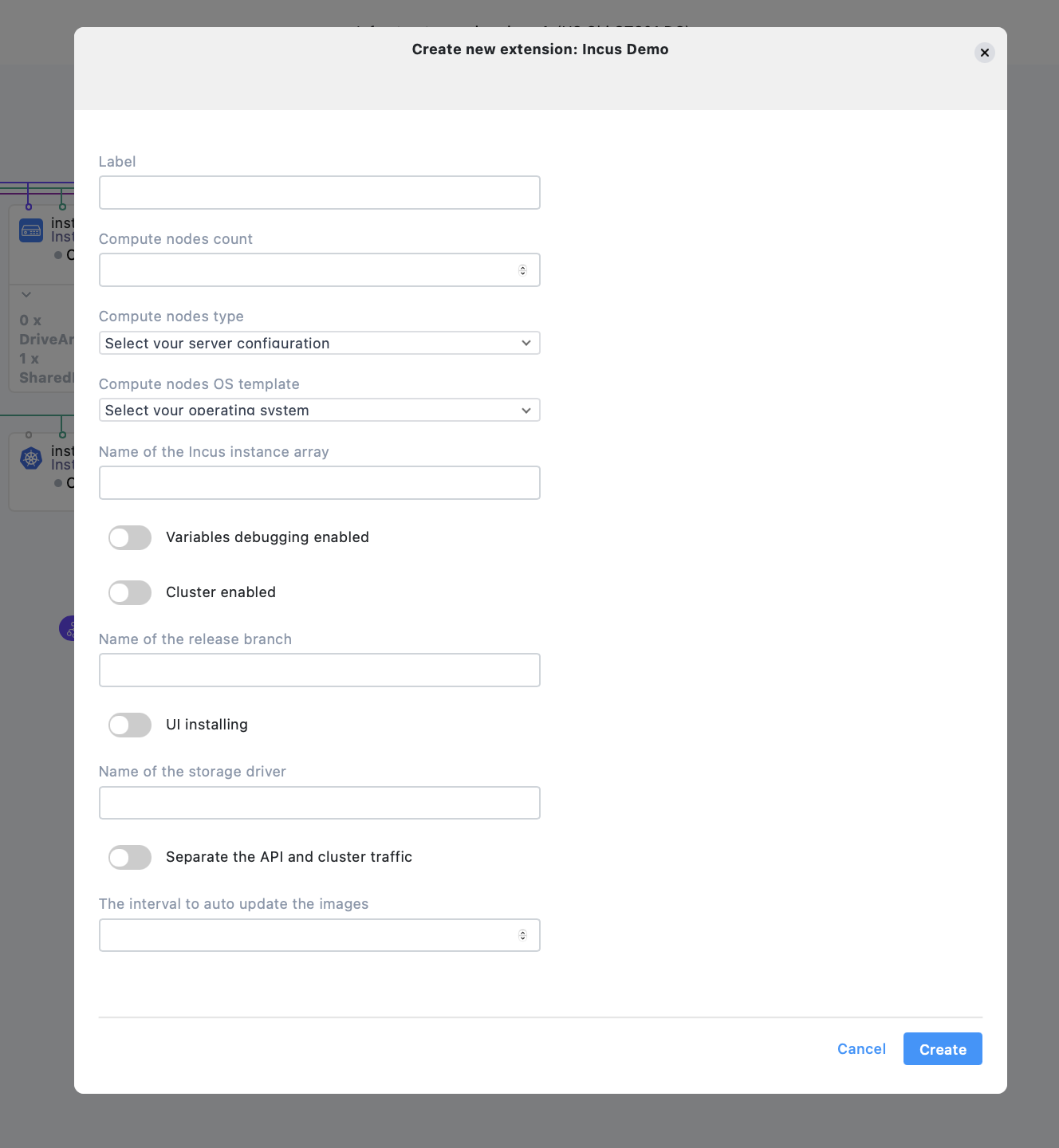
- MetalSoft creates the instance arrays, logical networks, IP allocations, and DNS records declared in the
infrastructuresection, substituting input values via#/input/<label>references. - Upon Deploy, MetalSoft provisions the resources and the
onCreatetasks execute (preDeploytasks before provisioning completes,postDeploytasks after the servers are up).
Update (edit) lifecycle
Section titled “Update (edit) lifecycle”- The user clicks the deployed extension in the Infrastructure Designer and a form opens allowing changes to the editable input parameters (inputs marked
setOnly: truecannot be changed). - Upon deploy, MetalSoft adjusts resources (e.g. adding or removing instances when a count input changes) and the
onEdittasks execute.
This is also how scale-out and scale-in work: the platform tells your playbooks which hosts are being added or removed via dedicated inventory groups. See Scale-out and scale-in.
Delete lifecycle
Section titled “Delete lifecycle”- The user deletes the extension instance in the Infrastructure Designer.
- Upon deploy, the
onDeletetasks execute and then MetalSoft releases all resources.
Definition example
Section titled “Definition example”A minimal application extension definition (extension.json). Note the array form of the lifecycle sections — each entry binds a stage (preDeploy or postDeploy) to a list of tasks:
{ "kind": "ExtensionDefinition", "schemaVersion": "1.1", "name": "My Cluster", "label": "my_cluster", "extensionType": "application", "vendor": "MetalSoft", "extensionVersion": "1.0.0", "description": "Deploys my clustered product", "icon": "none", "dependencies": { "controllerVersion": "v7.4.0" }, "inputs": [ { "label": "compute_nodes", "name": "compute_nodes", "inputType": "ExtensionInputInteger", "options": { "minValue": 1 }, "defaultValue": 3 }, { "label": "compute_node_server_type", "name": "compute_node_server_type", "inputType": "ExtensionInputServerType", "options": {} }, { "label": "compute_nodes_os_template", "name": "compute_nodes_os_template", "inputType": "ExtensionInputOsTemplate", "options": { "osFamily": "Linux" } } ], "outputs": [ { "label": "console_url", "name": "console_url", "outputType": "string" } ], "infrastructure": { "instanceArrays": [ { "label": "compute", "instanceCount": "#/input/compute_nodes", "serverType": "#/input/compute_node_server_type", "osTemplate": "#/input/compute_nodes_os_template", "customVariables": [ { "name": "cluster_role", "value": "worker" } ] } ] }, "assets": [ { "label": "my_ansible_bundle", "name": "My Ansible bundle", "assetType": "AnsibleBundle", "url": "https://repo.example.com/extensions/my-cluster-v1.0.0.zip" } ], "onCreate": [ { "stage": "postDeploy", "tasks": [ { "label": "createStep", "taskType": "ExtensionTaskAnsible", "options": { "asset": "my_ansible_bundle", "playbook": "deploy.yaml", "executionTimeout": 3600, "executionTimeoutTick": 30 } } ] } ], "onEdit": [ { "stage": "preDeploy", "tasks": [ { "label": "scaleInStep", "taskType": "ExtensionTaskAnsible", "options": { "asset": "my_ansible_bundle", "playbook": "scale.yaml", "executionTimeout": 3600, "executionTimeoutTick": 30 } } ] }, { "stage": "postDeploy", "tasks": [ { "label": "scaleOutStep", "taskType": "ExtensionTaskAnsible", "options": { "asset": "my_ansible_bundle", "playbook": "scale.yaml", "executionTimeout": 3600, "executionTimeoutTick": 30 } } ] } ], "onDelete": [ { "stage": "preDeploy", "tasks": [ { "label": "cleanupStep", "taskType": "ExtensionTaskAnsible", "options": { "asset": "my_ansible_bundle", "playbook": "cleanup.yaml", "executionTimeout": 1800, "executionTimeoutTick": 30 } } ] } ]}Complete production examples (OpenShift, VMware Cloud Foundation, Incus) are available in the metalsoft-extensions repository.
Definitions written for 6.4/7.0 used
infrastructure.instanceGroupsand lifecycle sections keyed by stage (onCreate: { postDeploy: [...] }). The current schema usesinfrastructure.instanceArraysand lifecycle sections as arrays of{ "stage": ..., "tasks": [...] }objects, as shown above.
Managing extensions via the CLI
Section titled “Managing extensions via the CLI”metalcloud-cli extension list # list all extensionsmetalcloud-cli extension get # get an extensionmetalcloud-cli extension create # create an extension (kind: application | workflow | action)metalcloud-cli extension update # update an extension (draft only)metalcloud-cli extension publish # draft -> activemetalcloud-cli extension archive # archive an extensionmetalcloud-cli extension make-public # control visibilityMetalSoft does not support deleting an extension — only archiving it. Publishing an extension allows users other than the owner to deploy it. See the Extensions overview for the full lifecycle.
After an extension is published, also enable it per site, on the site configuration page. This is also where the operator sets the extension’s configVars — the operator-provided, site-level values (e.g. DNS resolvers) that every instance of the extension receives at runtime.
A separate set of extension-instance commands manipulates extension instances — the deployments users create from an extension.