

Managing resource pools
Available since: version 6.3
Resource pools are groups of servers, subnet pools, and, in the future, other resources. Administrators can assign users specific resource pools, which allows only those users to use those resources.
By default, MetalSoft creates all resources in the default resource pool unless you explicitly assign them to a resource pool. When MetalSoft allocates servers to users, it selects them from the resource pools that those users have access to, plus the default pool. When you delete servers, MetalSoft returns them to the configured resource pool. If the resource pool has changed after the allocation, the server will return into the newly configured pool.
Creating a resource pool
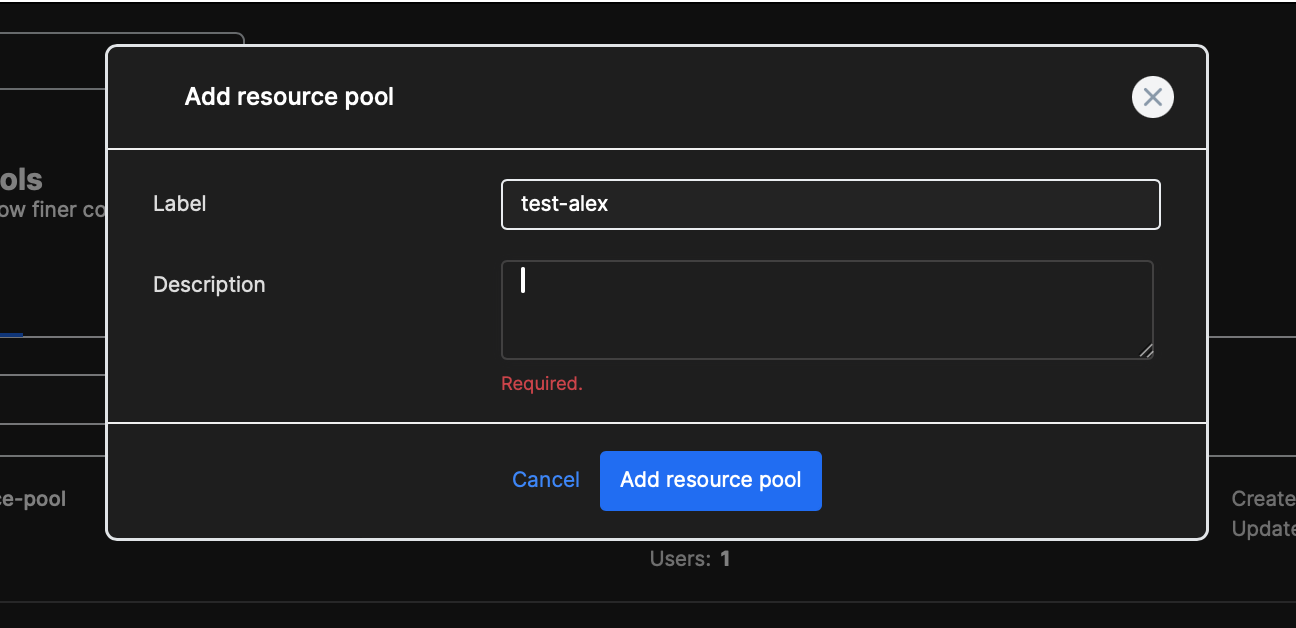
Section titled “Creating a resource pool”To create a resource pool, go to the Resource pools section.
Click “Add resource pool” button, provide a label (only letters and dashes allowed) and a description.
Deleting a resource pool
Section titled “Deleting a resource pool”To delete a resource pool, go to Resource pools > resource pool > Advanced tab. Click the delete resource pool button. If the resource pool has any resources assigned, MetalSoft unassigns them from the resource pool.
Assigning a server to a resource pool
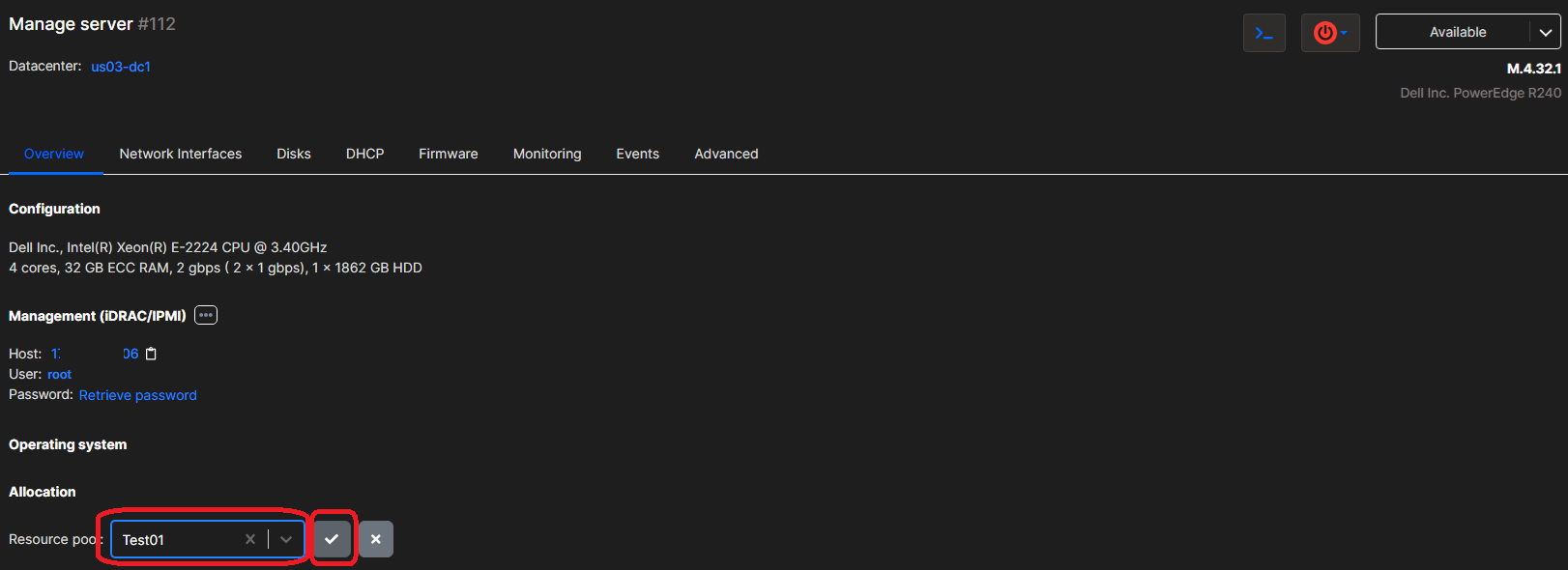
Section titled “Assigning a server to a resource pool”To assign a server to a resource pool, go to: Servers > server > Overview tab.
Search the resource pool in the dropdown and click ”✓” button.
Moving a server from a resource pool to another
Section titled “Moving a server from a resource pool to another”To assign a server to a resource pool, go to: Servers > server > Overview tab.
Search the resource pool in the dropdown in the same way as when first assigning the resource. Note that this has no effect on a server a user has already allocated (is using). The user will be able to continue to use it normally. However, if you delete the server, it will no longer go into the same pool but will move to the newly configured pool.
Removing a server from a resource pool
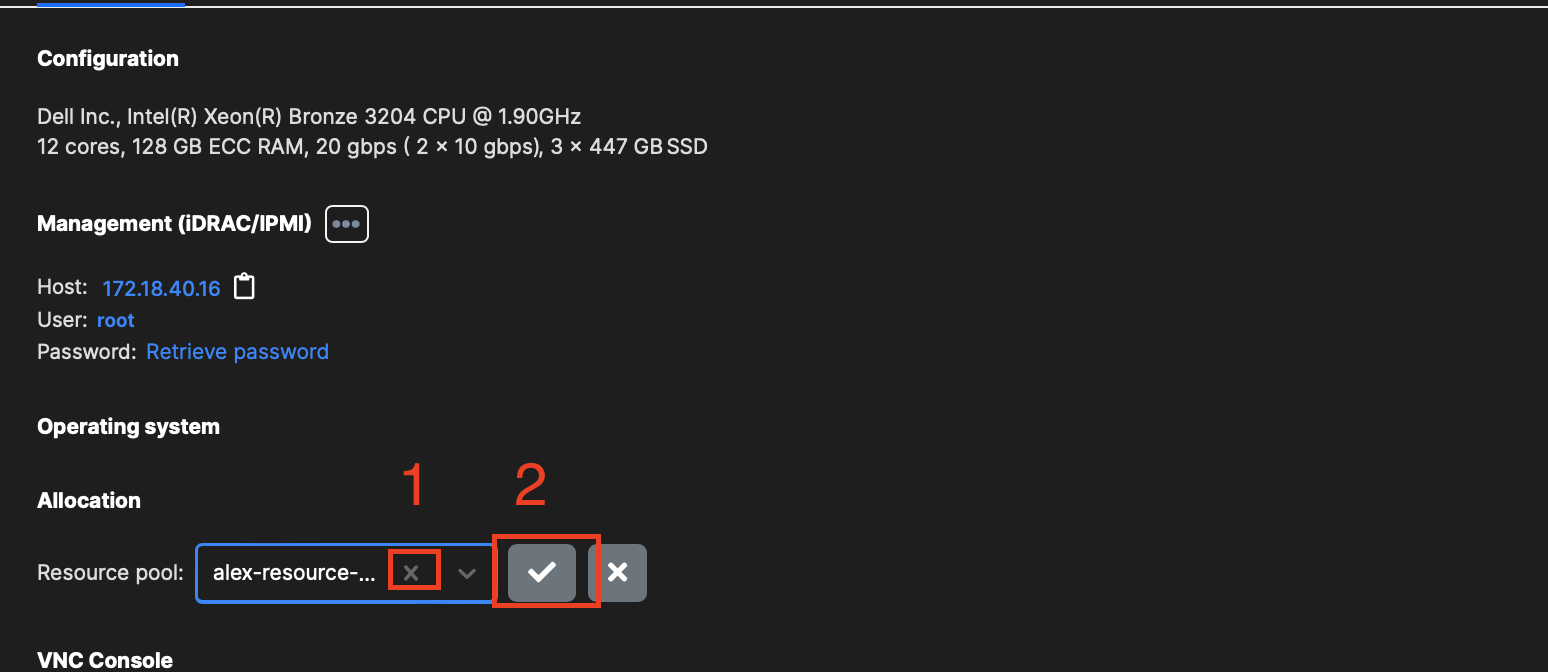
Section titled “Removing a server from a resource pool”To unassign a server from a resource pool, go to: Servers > server > Overview tab.
Click on the x next to the resource pool name and then on the ”✓” button.
Adding a subnet pool to a resource pool
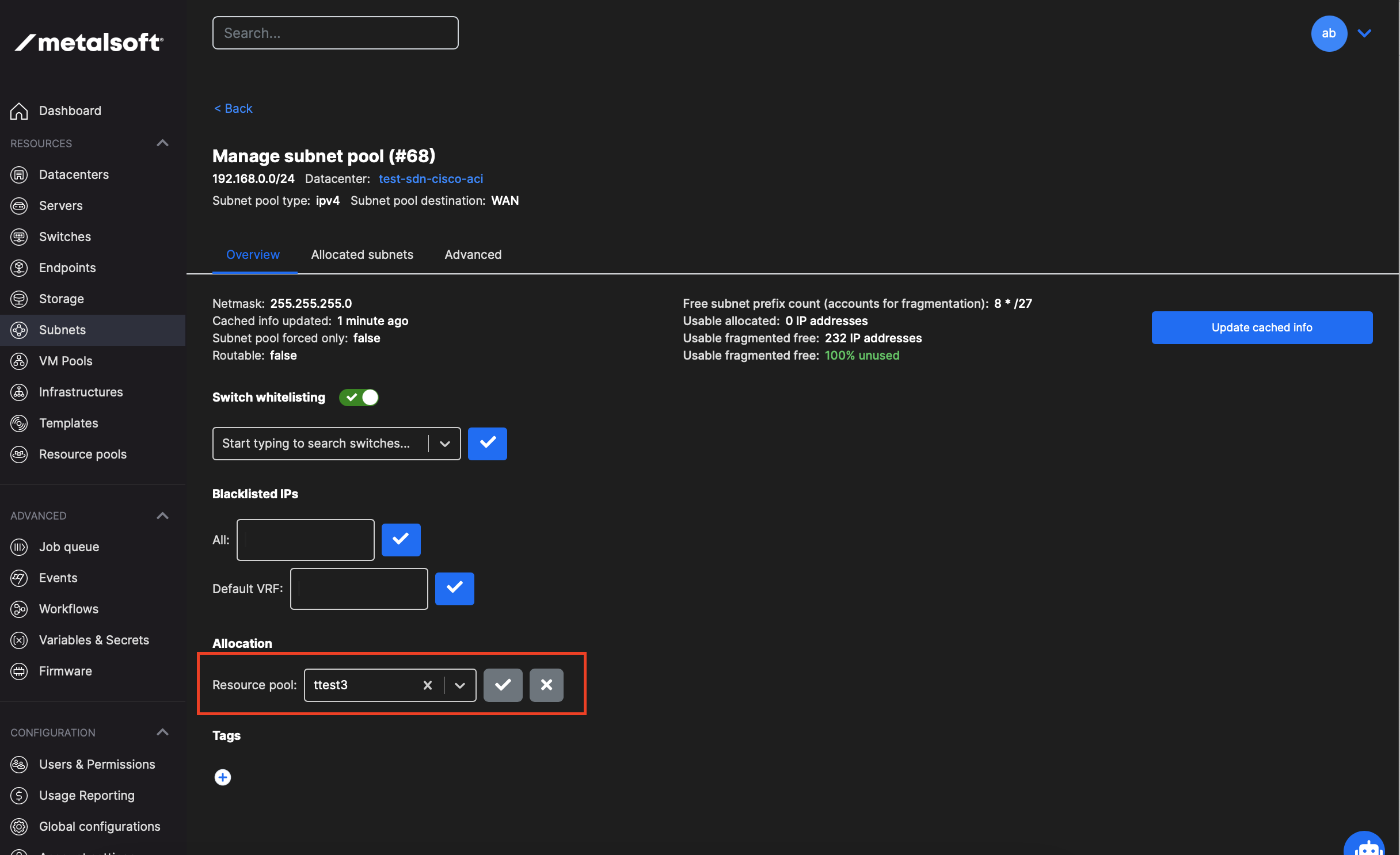
Section titled “Adding a subnet pool to a resource pool”To add a subnet pool to a resource pool, go to IPAM > subnet > Overview tab.
Search the resource pool in the dropdown and click ”✓” button.
Moving a subnet pool from a resource pool to another
Section titled “Moving a subnet pool from a resource pool to another”To change the resource pool of a subnet pool, go to IPAM > subnet > Overview tab.
Search the resource pool in the dropdown and click ”✓” button. This has no effect on already allocated subnet pools. If they are in use, users can continue to use the pool. MetalSoft stops using this subnet pool to provide subnets or individual IPs only when someone creates new infrastructures or requests new subnets.
Removing a subnet pool from a resource pool
Section titled “Removing a subnet pool from a resource pool”To remove the subnet pool from a resource pool, go to IPAM > subnet > Overview tab.
Click on the x next to the resource pool name and then on the ”✓” button.
Assigning resource pools to users
Section titled “Assigning resource pools to users”You can assign one or more resource pools to users.
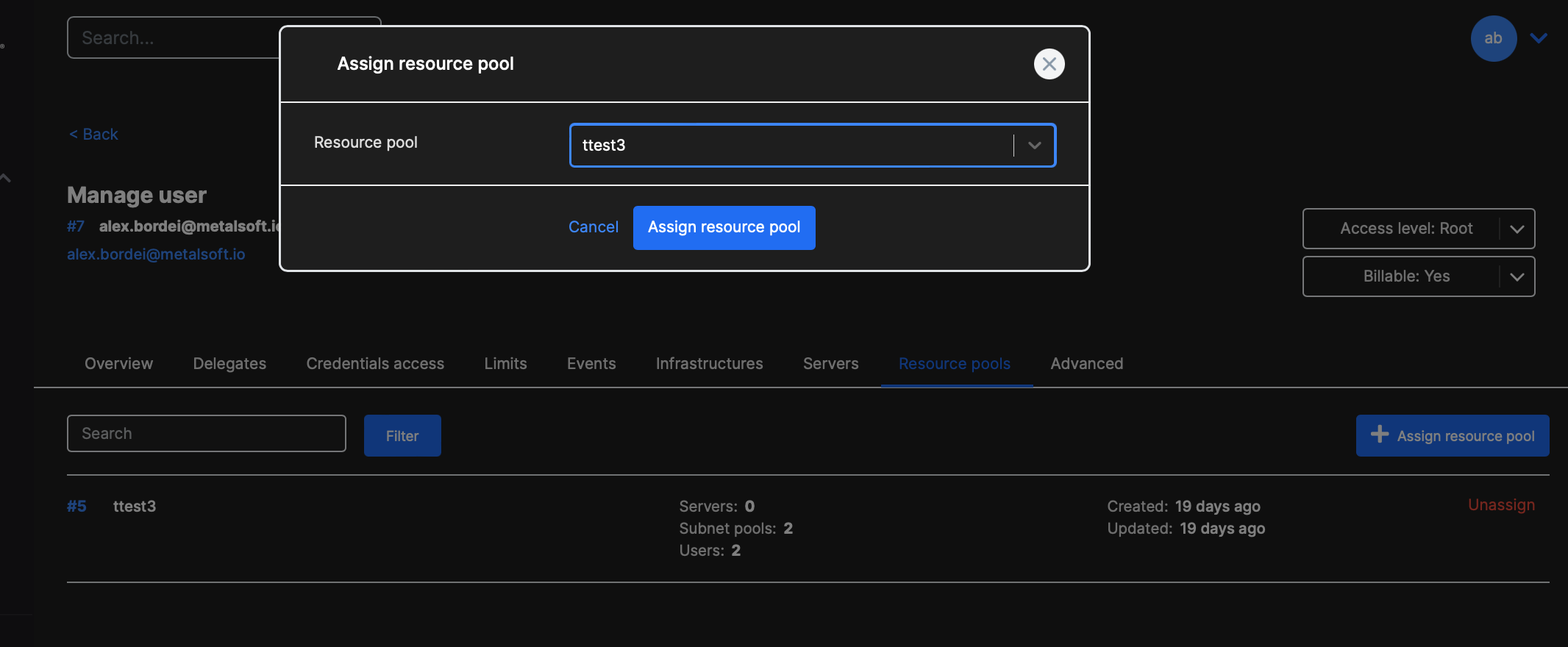
To assign a resource pool, go to: Users and permissions > Users > user > Resource pools tab.
Click the Assign resource pool button. Search for a particular resource pool and click “Assign resource pool”.
Unassigning a resource pool from a user
Section titled “Unassigning a resource pool from a user”To unassign a resource pool, go to: Users and permissions > Users > user > Resource pools tab.
Click the “unassign” button for the respective resource pool.
Managing resource pools via the API
Section titled “Managing resource pools via the API”Creating a resource pool
Section titled “Creating a resource pool”curl -X POST "https://<your-server>/api/v2/resource-pools" \ -H "Content-Type: application/json" \ -H "Authorization: Bearer <API_KEY>" \ -d '{ "label": "gpu-pool", "description": "Resource pool for GPU servers" }'Listing resource pools
Section titled “Listing resource pools”curl "https://<your-server>/api/v2/resource-pools" \ -H "Authorization: Bearer <API_KEY>"Adding a server to a resource pool
Section titled “Adding a server to a resource pool”curl -X PUT "https://<your-server>/api/v2/resource-pools/{resourcePoolId}/server/{serverId}" \ -H "Authorization: Bearer <API_KEY>"Removing a server from a resource pool
Section titled “Removing a server from a resource pool”curl -X DELETE "https://<your-server>/api/v2/resource-pools/{resourcePoolId}/server/{serverId}" \ -H "Authorization: Bearer <API_KEY>"Adding a subnet pool to a resource pool
Section titled “Adding a subnet pool to a resource pool”curl -X PUT "https://<your-server>/api/v2/resource-pools/{resourcePoolId}/subnet-pool/{subnetPoolId}" \ -H "Authorization: Bearer <API_KEY>"Adding a user to a resource pool
Section titled “Adding a user to a resource pool”curl -X POST "https://<your-server>/api/v2/resource-pools/user/{userId}/pool/{resourcePoolId}" \ -H "Authorization: Bearer <API_KEY>"Removing a user from a resource pool
Section titled “Removing a user from a resource pool”curl -X DELETE "https://<your-server>/api/v2/resource-pools/user/{userId}/pool/{resourcePoolId}" \ -H "Authorization: Bearer <API_KEY>"