

Authentication overview
Authentication in MetalSoft is distinct from authorization although they are frequently configured together.
UI users can log in to MetalSoft using:
- Built-in username & password
- SAML-compatible credentials
- LDAP-compatible credentials
API users can use the following methods to authenticate HTTP requests:
Authorization: Bearer <API_Key>header. Consult the Developer resources for more information.
The role parameter
Section titled “The role parameter”Permissions depend on the role that a user has. For built-in authentication, an admin configures this role on each user. For LDAP and SAML authenticators, MetalSoft receives the role along with the user after the login process, based on the groups the user belongs to.
Consult the following for examples on how to configure the role-to-group mapping.
- Configuring SAML authentication for OKTA
- Configuring LDAP authentication for Microsoft Authenticator
The login flow
Section titled “The login flow”The login flow is a multi-stage process which depends on the configuration and enabled/disabled features such as two-factor authentication. The following diagram details the process:
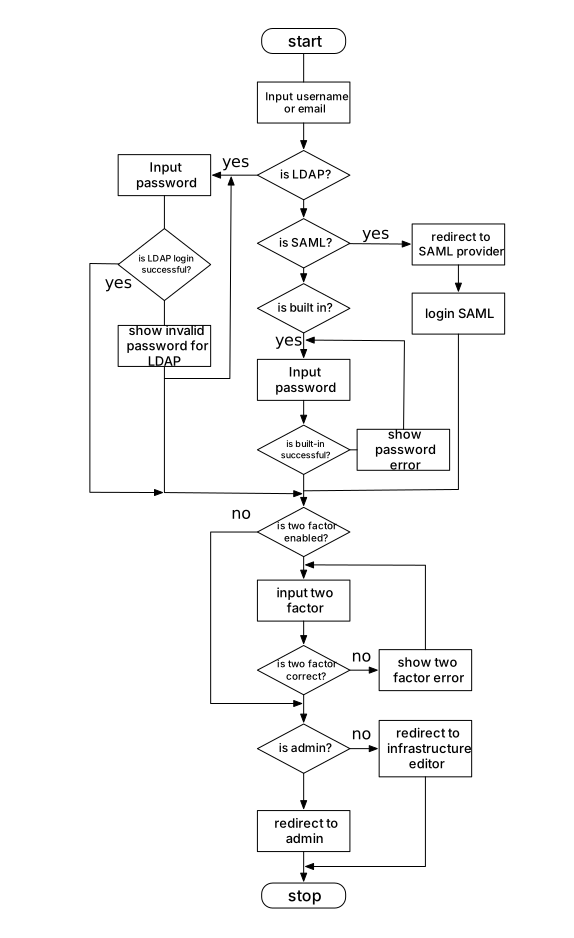
Multiple auth methods can be active at the same time. They are matched against the domain of the email. For example, you could configure @example.io users to use LDAP authentication and @example2.com users to use built-in authentication.
MetalSoft uses the configured default authentication mechanism if no other authentication method’s domain matches. You cannot use the same domain for two different authenticator methods.
Two-factor (MFA) authentication
Section titled “Two-factor (MFA) authentication”MetalSoft supports the use of the two-factor authentication feature. Supported authentication mechanisms are Google Authenticator and Microsoft Authenticator.
Users can enable it individually for their own account, independent of the authentication method used. To enable 2FA, go to Account settings > 2FA Authenticator.