Integrating with a customer portal
There are two major types of integrations with external customer portals:
- Direct: End-client uses MetalSoft’s user portal to deploy infrastructure
- Indirect: End-client uses customer portal to deploy infrastructure
Direct integration with an upstream customer portal
Section titled “Direct integration with an upstream customer portal”In this setup, MetalSoft exposes its end user portal (the drag and drop interface) to the user.
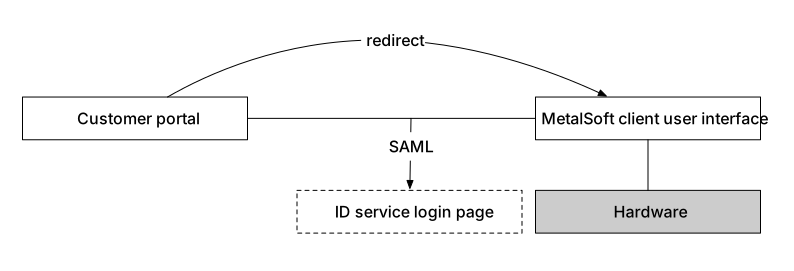
This setup is relatively easy to deploy and provides a good user experience to end-users for bare-metal-as-a-service offerings. It is, however, not suitable if other high-level services such as VM-as-a-Service are offered.
There are multiple supported mechanisms for authenticating users in the MetalSoft portal. More than one can be active at any given time:
- Using SAML (recommended)
- Using LDAP
- Using built-in authentication
The choice will depend on the capabilities of the portal. For more information visit Authentication Overview.
SAML-compatible ID service (recommended)
Section titled “SAML-compatible ID service (recommended)”If the existing user portal uses a SAML-compatible ID service such as Azure AD, OKTA, or Auth0 for login, this setup is very simple, as MetalSoft can be configured to use the same SAML provider from the Global Configuration > Authentication tab.
For an example configuration consult: Configuring SAML for OKTA
LDAP-compatible ID service
Section titled “LDAP-compatible ID service”If the existing user portal uses an LDAP-based login (FreeIPA, Active Directory), configure MetalSoft to use the LDAP protocol from the Global Configuration > Authentication tab.
For an example configuration consult: Configuring LDAP for Microsoft Active Directory
Built-in authentication
Section titled “Built-in authentication”MetalSoft’s built-in user management system is relatively robust. A portal could either:
- Create the users and set passwords using the API.
- Let users sign up on MetalSoft’s sign-up page.
Enabling user sign-up
Section titled “Enabling user sign-up”A partner portal could redirect users to the MetalSoft sign-up page. To enable the built-in sign-up process: Global Configuration > Authentication > Signup page enabled.
Once enabled, the signup button and the sign-up process become available at https:/<env_hostname>/en/signup.
Note that users can also enable or disable the authenticator on their own account.
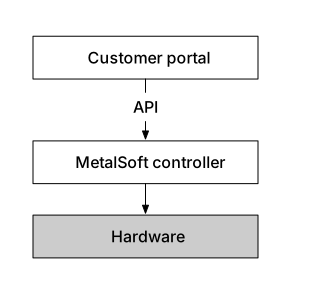
Indirect integration with an upstream customer portal
Section titled “Indirect integration with an upstream customer portal”In many situations the upstream portal will use API calls to manage infrastructures: