

Adding a new storage pool
An iSCSI storage pool provides users with persistent disk space. A drive from a drive array is allocated to a volume (also called LUN) from a storage pool. Storage pools are typically storage appliances.
MetalSoft must support the appliance, meaning MetalSoft knows the provisioning API well enough to create, modify, and delete new volumes, associate IQNs, etc.
Adding a new storage pool
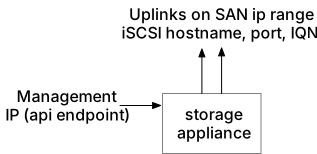
Section titled “Adding a new storage pool”Before configuring the new storage, install and configure it to be reachable on the management interface as well as the in-band interfaces. Also check the Storage Prerequisites page for the specific storage appliance.
MetalSoft does not automatically configure the storage pool’s internal pool, but rather only the volumes inside this pool. This allows the administrator to pre-configure RAID options, compression, de-duplication, or any vendor-specific options.
- Go to the Admin interface
- Select “Storage” from the left sidebar menu
- Click on “Add Storage Pool”
- Add a Storage name and select the Site where the storage appliance is installed
- Select the appropriate driver, the Storage type and the Storage technologies
- Enter the management API’s endpoint. Typically this endpoint URL is found in the appliance’s documentation.
- Select the Subnet type (IPv4 or IPv6)
- Enter the Storage pool array id (the ID of the storage system, this is normally the first ID fragment from the URL of a storage object in the UI)
- Set the maintenance flag on if the storage should not be automatically available to users.
- Set the experimental flag on if the storage should be available only to users with the “experimental” flag on.
- The storage name is a name available only to admins
- The password field is the password that the system uses to provision LUNS via the management API. It is not what servers will use to connect over iSCSI. MetalSoft generates that password automatically.
- The pool should appear in the list. Check that available disk space is what is expected.