

Power DNS integration
MetalSoft integrates with an external DNS system through an extension that triggers when certain buttons or API calls are used in the user interface:
As with all extensions, the DNS extension calls originate from and execute on the Site Controller. This:
- Creates and deletes A, AAAA (for IPv6), and PTR records for server instances when they get deployed and deleted from infrastructures.
- Creates and deletes A, AAAA (for IPv6), and PTR records for servers when registered and deleted.
- Creates and deletes A, AAAA (for IPv6), and PTR records for switches when registered and deleted.
For this to work the following conditions must be met:
- The Ansible Runner capability must be enabled on the site controller. It is not a standalone service — it is enabled by setting
ANSIBLE_RUNNER=enabledand its companion variables on thems-agentservice. - The DNS extension must be installed.
- The workflow extension must also be enabled for the site, on the site level configuration page (this is also where the extension’s configVars are set, if any).
- The Ansible bundle capable of talking to the underlying DNS service must be uploaded to the repository.
MetalSoft provides a sample PowerDNS DNS service in the Site Controller and the associated sample extensions.
Enabling the sample Power DNS service on the Site Controller
Section titled “Enabling the sample Power DNS service on the Site Controller”MetalSoft provides a sample DNS service that leverages PowerDNS to demonstrate how to integrate with other systems and to be used in POC Envs. The sample dns service is disabled by default. To enable it follow the following instructions on the Site Controller:
- Create a directory
mkdir -p /opt/metalsoft/pdns- Add the following to
/opt/metalsoft/agents/docker-compose.yaml
pdns-auth-recursor: container_name: pdns-auth-recursor network_mode: host hostname: pdns-auth-recursor image: registry.metalsoft.dev/sc/sc-pdns-auth-recursor:develop restart: always environment: - TZ=Etc/UTC volumes: - /opt/metalsoft/pdns:/appdata- Bring everything up
cd /opt/metalsoft/agentsdocker compose up -dInstalling the DNS MetalSoft extension
Section titled “Installing the DNS MetalSoft extension”- Clone the sample DNS workflow repository.
git clone https://github.com/metalsoft-io/metalsoft-extensionscd metalsoft-extensionscd power-dns- Update the references to the DNS service in the ansible bundle.
Edit the ansible/roles/powerdns/defaults/main.yml file and update the following variables:
powerdns_api_host: "localhost"powerdns_api_port: 8081powerdns_api_key: "your-api-key"The powerdns_api_host is the IP address of the Site Controller. The default powerdns_api_port is 8081.
To retrieve the powerdns_api_key key from the image run the following command from the Site Controller:
docker exec -it pdns-auth-recursor grep api-key /etc/powerdns/pdns.conf | awk -F '=' '{print $2}'- Create a zip file of the contents of the ansible directory.
cd ansiblezip ../power_dns.zip deploy_dns_flexible.yaml rolescd ..-
Upload the ansible bundle zip to an http server reachable by the Global Controller such as:
https://repo.metalsoft.io/.extensions_ms/workflows/power_dns.zip. -
Update the ansible bundle
URLin thepower-dns/extension.jsonfile in theassetssection to match the URL where the bundle will be accessible.
"assets": [ { "label": "power-dns-configuration", "name": "power-dns-configuration", "assetType": "AnsibleBundle", "url": "https://repo.metalsoft.io/.extensions_ms/workflows/power_dns.zip" }],- Install the extension using the CLI:
metalcloud-cli extension create test-dns workflow "test dns workflow" --definition-source power-dns/extension.json --format json- Publish the extension.
metalcloud-cli extension publish 1- Go to Global Configuration > DNS and ensure that the configuration is correct for your environment, especially the NS.
- Go to Sites > Site and ensure that the DNS zone that is selected in the drop-down is the one configured in the Global Configurations.
Enable the Ansible Runner capability on the site controller
Section titled “Enable the Ansible Runner capability on the site controller”The ms-agent service on the Site Controller can execute Ansible scripts, running each task in an ephemeral execution environment container, but this capability is not enabled by default. Follow Enabling the Ansible Runner Capability to enable it — restarting the site controller’s containers as described there also brings up the PowerDNS service enabled above.
Using the DNS extension to create DNS records for servers and endpoints
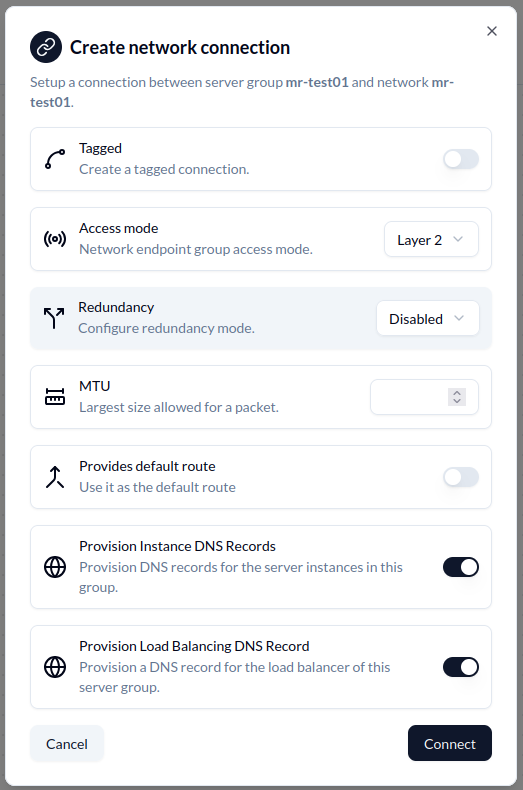
Section titled “Using the DNS extension to create DNS records for servers and endpoints”To create the records in the DNS via the extension, connect an endpoint to a network. The DNS options are available under Provision Instance DNS Records and Provision Load Balancing DNS Record.
The first option creates records for each server, endpoint, or VM attached to the network, whereas the last creates a single DNS record with CNAME entries for all.
Customizing the DNS record MetalSoft creates
Section titled “Customizing the DNS record MetalSoft creates”The default records look like this:
ID: 26Domain: eveng-qa02.metalcloud.ioName: instance-3878.eveng-qa02.metalcloud.ioType: AContent: 10.255.146.232TTL: 3600 ✓If the hostname field of the instance object is not set, the system uses instance-${instance_id} as a prefix. To customize the resulting entry, edit the hostname field of the server instance object (not server instance group).
More details on the behavior of the extension
Section titled “More details on the behavior of the extension”Consult the Extension Readme for more details on the behaviour of the extension and how to modify it to suit your needs.
Ports open
Section titled “Ports open”In addition to the normal Site Controller ports, this component adds the following port:
- port 53 -> the DNS recursor listens on this port for DNS requests.
Enabling DNS records on servers and switches
Section titled “Enabling DNS records on servers and switches”The mechanism is capable of creating DNS records for the servers’s BMCs interfaces as well. This is useful in Ipv6-only environments.
To enable it append the two tasks to the extension definition:
{ "stage": "serverCreateDNS", "tasks": [ { "label": "create-dns-and-ptr-records-for-server", "taskType": "ExtensionTaskAnsible", "options": { "asset": "power-dns-configuration", "playbook": "deploy_dns_flexible.yaml" } } ] }, { "stage": "serverDeleteDNS", "tasks": [ { "label": "delete-dns-and-ptr-records-for-server", "taskType": "ExtensionTaskAnsible", "options": { "asset": "power-dns-configuration", "playbook": "deploy_dns_flexible.yaml" } } ] }A complete example can be found on github.