

Managing tenant networks
Tenant networks are managed through logical networks, network connections, and endpoint groups within an infrastructure. This page covers how connections, link aggregation, and redundancy work at the tenant level.
Network connections
Section titled “Network connections”A network connection links a server instance group, VM instance group or endpoint group to a logical network. When creating a connection you can configure:
- Tagged/Untagged — whether the VLAN tag is preserved on the interface
- Access mode — how the port is configured on the switch
- MTU — the maximum transmission unit for the connection
- Provides default route — whether this network provides the default gateway
- Disable auto IP allocation — opt out of automatic IP assignment
- Redundancy — the redundancy configuration (see below)
- DNS — DNS records to provision for the connection
Redundancy configuration
Section titled “Redundancy configuration”When connecting endpoints to a logical network, you can specify a redundancy configuration that controls how multiple ports are bonded:
| Redundancy Mode | Description |
|---|---|
| active-backup | One link is active, the other is standby. Traffic fails over if the active link goes down. |
| active-active | All links are active simultaneously, providing increased bandwidth and redundancy. |
Each mode can use one of these implementation types:
| Implementation Type | Description |
|---|---|
| link-aggregation | Bundles multiple links on the same switch using LACP. |
| distributed-link-aggregation | Bundles links across a switch pair (MLAG/VLT/VPC). Requires a switch pair. |
| ecmp | Uses Equal-Cost Multi-Path routing across multiple links. |
Details on link aggregation
Section titled “Details on link aggregation”When you connect two or more ports to the same logical network, MetalSoft creates a link aggregation on the switches and a bond interface on the server:
-
If the two ports lead to different switches defined as a switch pair, MetalSoft creates an M-LAG or equivalent multi-chassis link aggregation (distributed-link-aggregation), using LACP type 4 as the negotiation protocol.
-
If the two ports lead to two different switches configured in a “stacked” configuration, in which case MetalSoft registers a single switch record, MetalSoft creates regular link aggregations using LACP type 4.
-
If the two ports lead to the same switch, MetalSoft creates a simple link aggregation on the respective switch, configured using LACP type 4.
To ensure consistent behavior, MetalSoft sets the LACP priority higher on the port with the lower index, so that if the LACP protocol cannot negotiate with the server (such as during the boot process), the fallback port is always the port with index #0.
MetalSoft now manages link aggregations at the fabric level (between switches, as opposed to between servers and switches) as standalone resources. See Managing BGP Sessions and Link Aggregations for details.
How server interface indexes are allocated
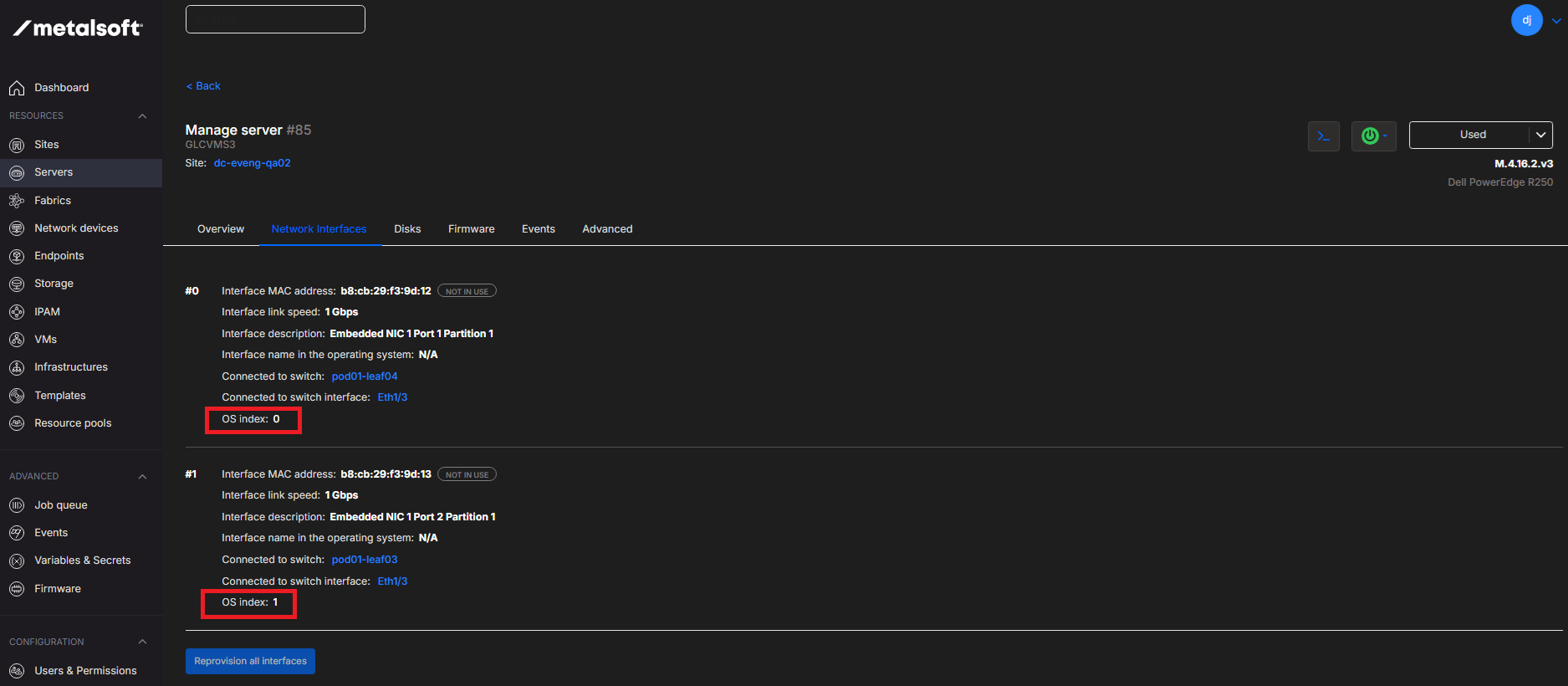
Section titled “How server interface indexes are allocated”To ensure consistent behavior, MetalSoft always indexes a server’s network ports based on the switch hostname and then the switch port, in lexicographic order, irrespective of the actual order on the server. For example, if a server connects to two switches with hostnames sw1 and sw2, and connects to Ethernet10 on both, the port connected to sw1 is always port index #0, and the port connected to sw2 is always port #1. If the same server connects to sw1 Ethernet11 and sw1 Ethernet10, the second port is index #0 and the first one is #1.
OS interface index
Section titled “OS interface index”MetalSoft provides OS index information for interfaces, which is what VMware ESXi uses to name the interfaces; thus, OS index 1 is the vmk1 interface.
Virtualization networking
Section titled “Virtualization networking”MetalSoft uses a novel networking approach for the virtualization by tying the VMs into the same network as bare metal servers. This means that the network admin can reuse the network profiles, subnets, external connections, etc. To learn more, go to Managing VM Pools.
Where to go from here: