

Quota profiles
Quota profiles are named, reusable sets of resource limits. A profile is created once and can be assigned to multiple users, making it easy to enforce consistent limits across a team or account without configuring each user individually.
How quota profiles are applied
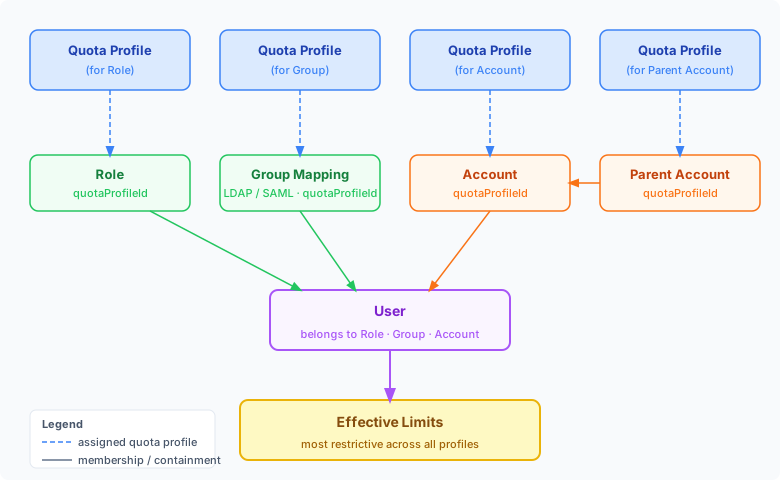
Section titled “How quota profiles are applied”A quota profile can be attached to four different objects that all influence a user’s effective limits:
| Assignment point | How to set it |
|---|---|
| Role | Assign a profile to a role; every user with that role inherits its limits |
| Group Mapping | Assign a profile to an LDAP/SAML group mapping; matched users inherit its limits |
| Account | Assign a profile to an account; all users in that account inherit its limits |
| Parent Account | Assign a profile to a parent account; limits cascade down to all child accounts |
When a user belongs to multiple objects that each carry a quota profile, MetalSoft computes the effective limits as the most restrictive value across all applicable profiles. For example, if a user’s role allows 20 server groups but their account only allows 10, the effective limit is 10.
The /api/v2/users/{userId}/quota-limits-breakdown endpoint returns the full breakdown — effective limits alongside the contribution from each source — which is useful for debugging why a user is hitting a limit.
Creating a quota profile
Section titled “Creating a quota profile”Navigate to Users & Permissions > Quota Profiles and click Add Quota Profile.
Fill in:
| Field | Description |
|---|---|
| Name | Human-readable name for the profile |
| Description | Optional description |
| Limits | The resource limits included in this profile |
Managing quota profiles via the API
Section titled “Managing quota profiles via the API”Creating a quota profile
Section titled “Creating a quota profile”curl -X POST "https://<your-server>/api/v2/quota-profiles" \ -H "Content-Type: application/json" \ -H "Authorization: Bearer <API_KEY>" \ -d '{ "name": "Standard User", "description": "Default limits for standard users", "limits": { "infrastructureServerGroupMaxCount": 5, "serverGroupInstancesMaxCount": 10, "infrastructureVmInstanceGroupMaxCount": 3, "allowedSites": ["site-a", "site-b"] } }'The optional id field lets you set a custom string identifier (lowercase letters, digits, and hyphens). If omitted, an ID is generated automatically.
Listing quota profiles
Section titled “Listing quota profiles”curl "https://<your-server>/api/v2/quota-profiles" \ -H "Authorization: Bearer <API_KEY>"Getting a quota profile
Section titled “Getting a quota profile”curl "https://<your-server>/api/v2/quota-profiles/{profileId}" \ -H "Authorization: Bearer <API_KEY>"Updating a quota profile
Section titled “Updating a quota profile”curl -X PATCH "https://<your-server>/api/v2/quota-profiles/{profileId}" \ -H "Content-Type: application/json" \ -H "Authorization: Bearer <API_KEY>" \ -d '{ "limits": { "maxServers": 25 } }'Updating a profile immediately affects all users assigned to it.
Deleting a quota profile
Section titled “Deleting a quota profile”curl -X DELETE "https://<your-server>/api/v2/quota-profiles/{profileId}" \ -H "Authorization: Bearer <API_KEY>"Getting a user’s quota limits breakdown
Section titled “Getting a user’s quota limits breakdown”To see the resolved limits for a specific user (taking into account their assigned profile and any overrides):
curl "https://<your-server>/api/v2/users/{userId}/quota-limits-breakdown" \ -H "Authorization: Bearer <API_KEY>"